Join the free beta

For venue managers

A lit room every night. Nobody on the lighting rota.

You have a rig, a different act most nights, and nobody whose job is lighting. Set Vaib up once with whoever knows the rig best; after that, whoever opens up presses Go — and the room looks like someone cared.

Free beta, open now. Mac first, Windows in about a month. A year free after launch for testers.

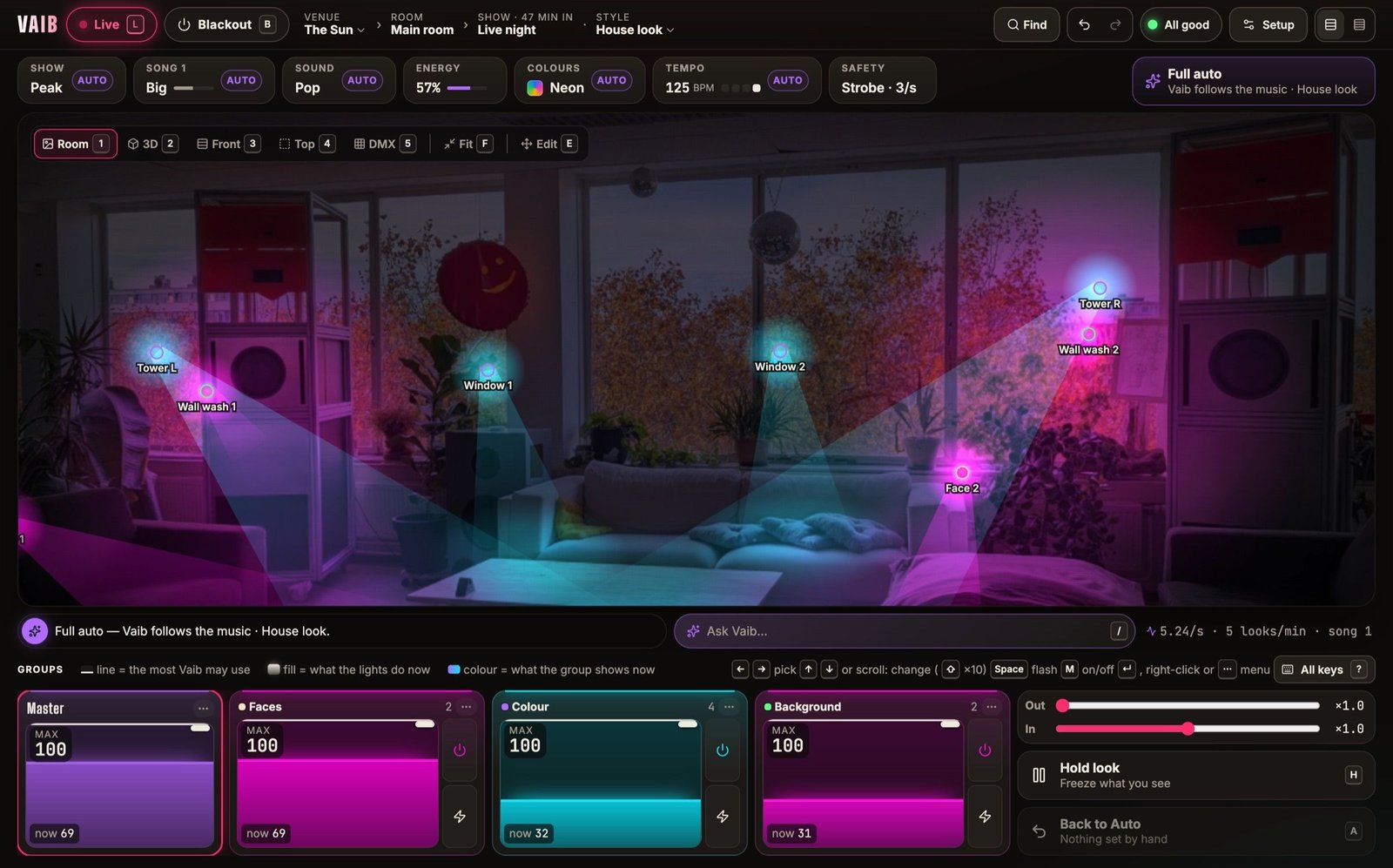
The Vaib desk, Live at The Sun: a small bar room with tall speaker towers lit pink and cyan by eight lights, House look, 125 BPM.
The Sun, a bar with eight lights, at the peak of a house night.

Every night

Open the app, press Go.

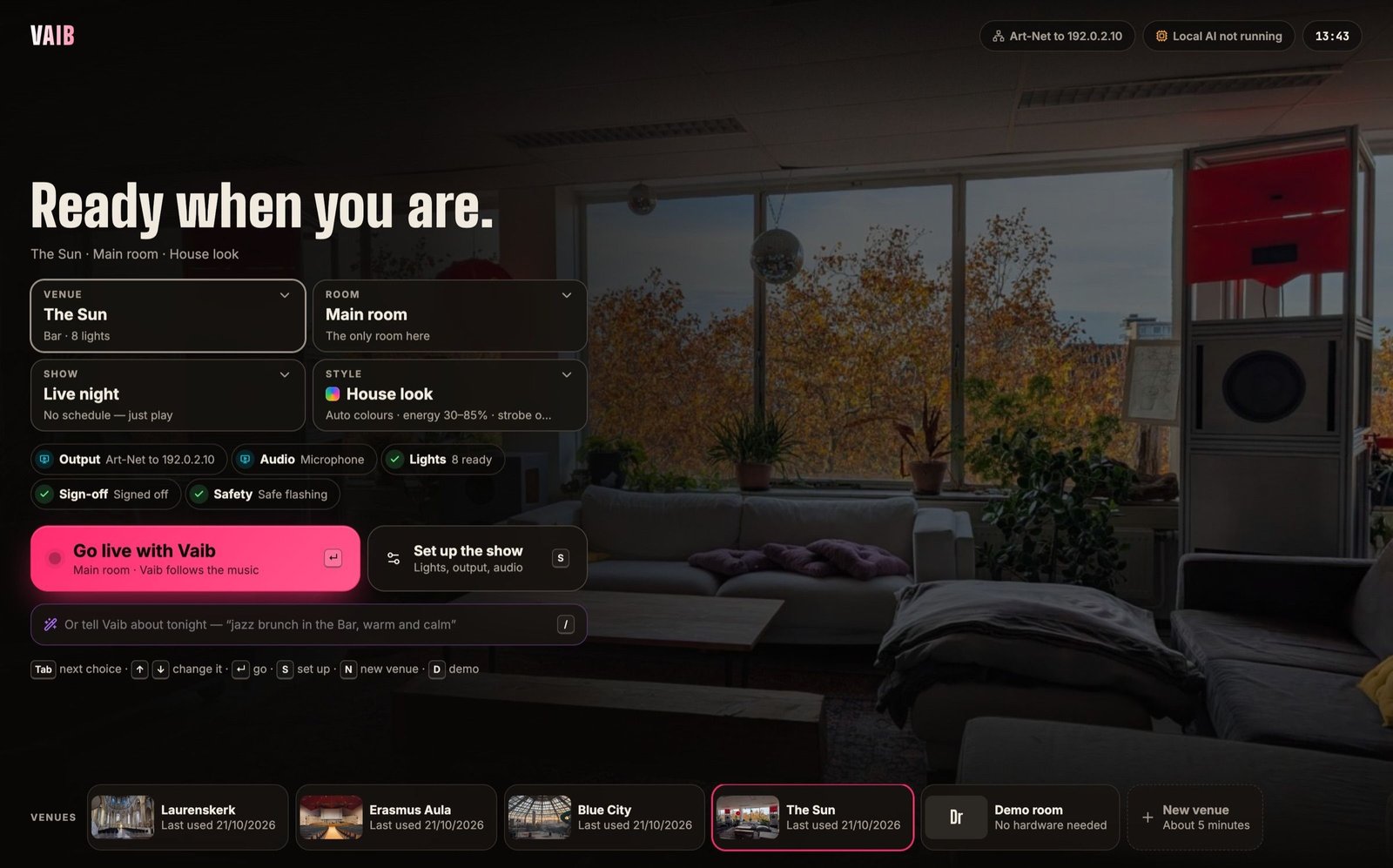
The start screen says what tonight is — the venue, the room, the Style — and whether everything is ready: the output answers, the audio is heard, the lights are tested, the room is signed off. If something is not, it says what and where to fix it.

  • Picks up where the room was left
  • Live and Blackout never come back on by themselves
  • A demo room to try it with no hardware at all
The Vaib start screen over a photo of The Sun: “Ready when you are.”, cards for venue, room, show and style, checks for output, audio, lights, sign-off and safety, a large pink “Go live with Vaib” button, and the venues in a row along the bottom.
The start screen: one big button, and every check that matters in a row under it.

Setup, once

Patch the rig in an afternoon. A small bar in about five minutes.

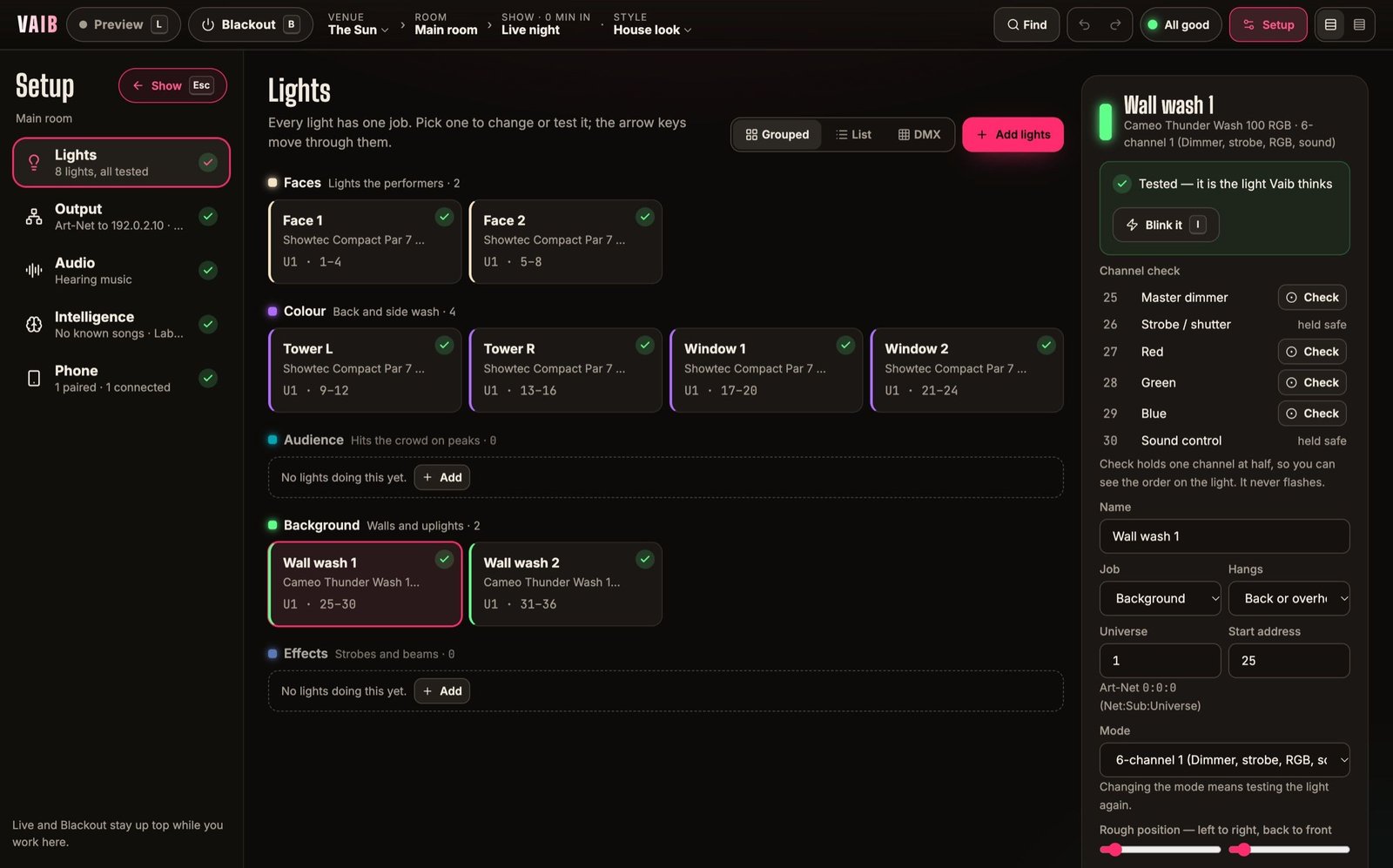
Find each light in the library by maker and model, say how many and where they hang, and give each one a job: faces, colour, audience, background or effects. Vaib tests each light with a slow breathe — never a flash — and you confirm it is the right one.

  • Addresses run on by themselves
  • Common fixtures built in; import OFL or GDTF files
  • Sends sACN with no IP to type
Setup › Lights at The Sun: eight lights shown as cards under their jobs — Faces, Colour, Background — each with a green tested mark and its DMX address; the picked light’s channel check on the right.
Setup › Lights at The Sun: eight lights under their jobs, each one tested.

Signed off

It will not send a show until a Manager has checked the rig.

Every light tested, no two lights on the same address, the output set, Blackout seen to work. Then the room is signed off and Live goes to the lights. Change an address, a mode or a fixture later and the sign-off goes, so the rig is checked again.

A card titled “Before the show goes to the lights”, marked Signed off: “Signed off for these 8 lights. Press Live (L) to send the show.”, with a button to withdraw the sign-off.
The sign-off card in Setup › Output.

Behind the bar

Your staff steer it from their phone.

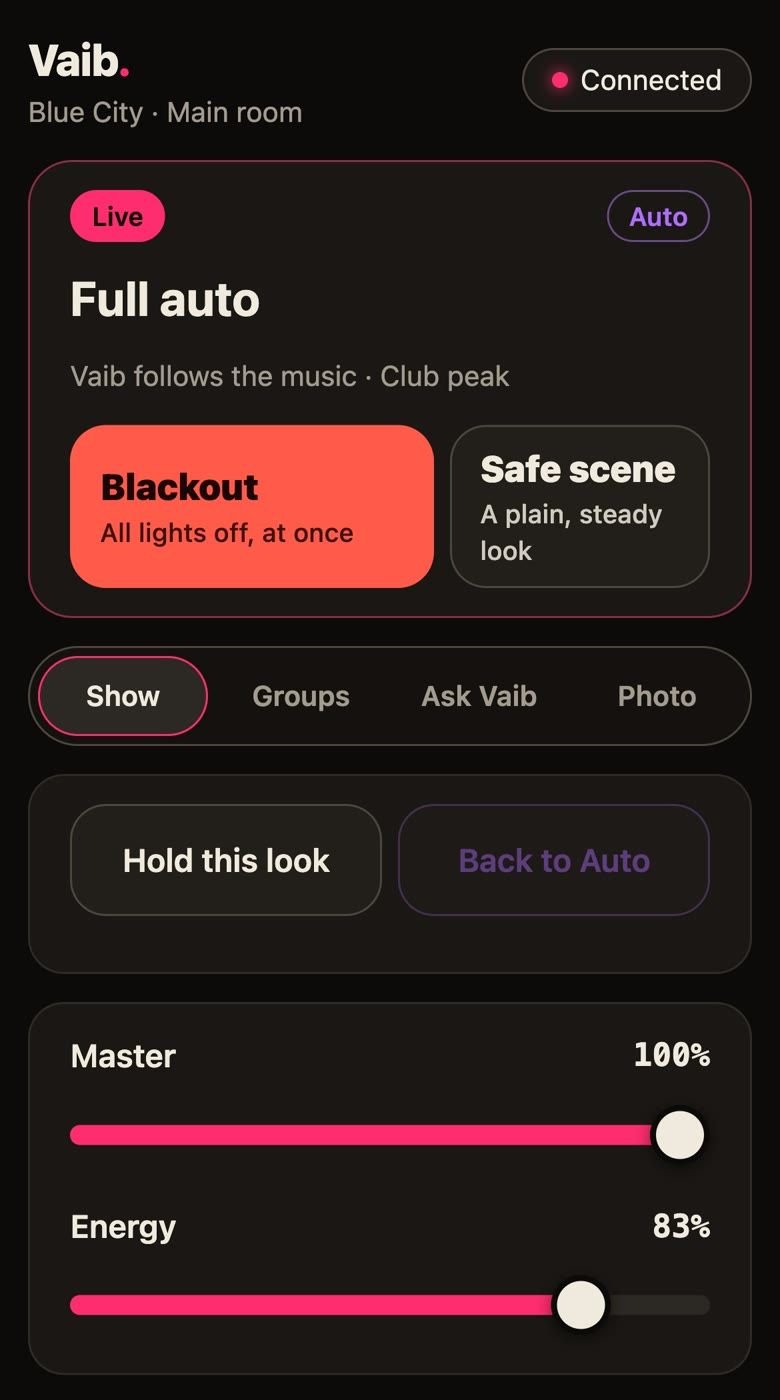
Pair any phone on the venue Wi-Fi with a six-digit code. As an Operator it gets Blackout, the safe scene, Hold, the group sliders, Energy and Ask Vaib; as a Performer just Blackout, the safe scene and master. A phone can make things safer, never riskier — raising a limit is for a Manager, at the desk.

  • No app to install, no account
  • Every phone change is one undo step on the desk
  • Pairing lasts 24 hours; remove a phone at once
The Vaib phone remote, connected to Blue City: Live and Full auto, a large Blackout button and Safe scene, tabs for Show, Groups, Ask Vaib and Photo, Hold this look, and Master and Energy sliders.
A paired phone, as an Operator, while the desk runs Blue City.

Any kind of night

Music, a speaker, a choir, a club peak.

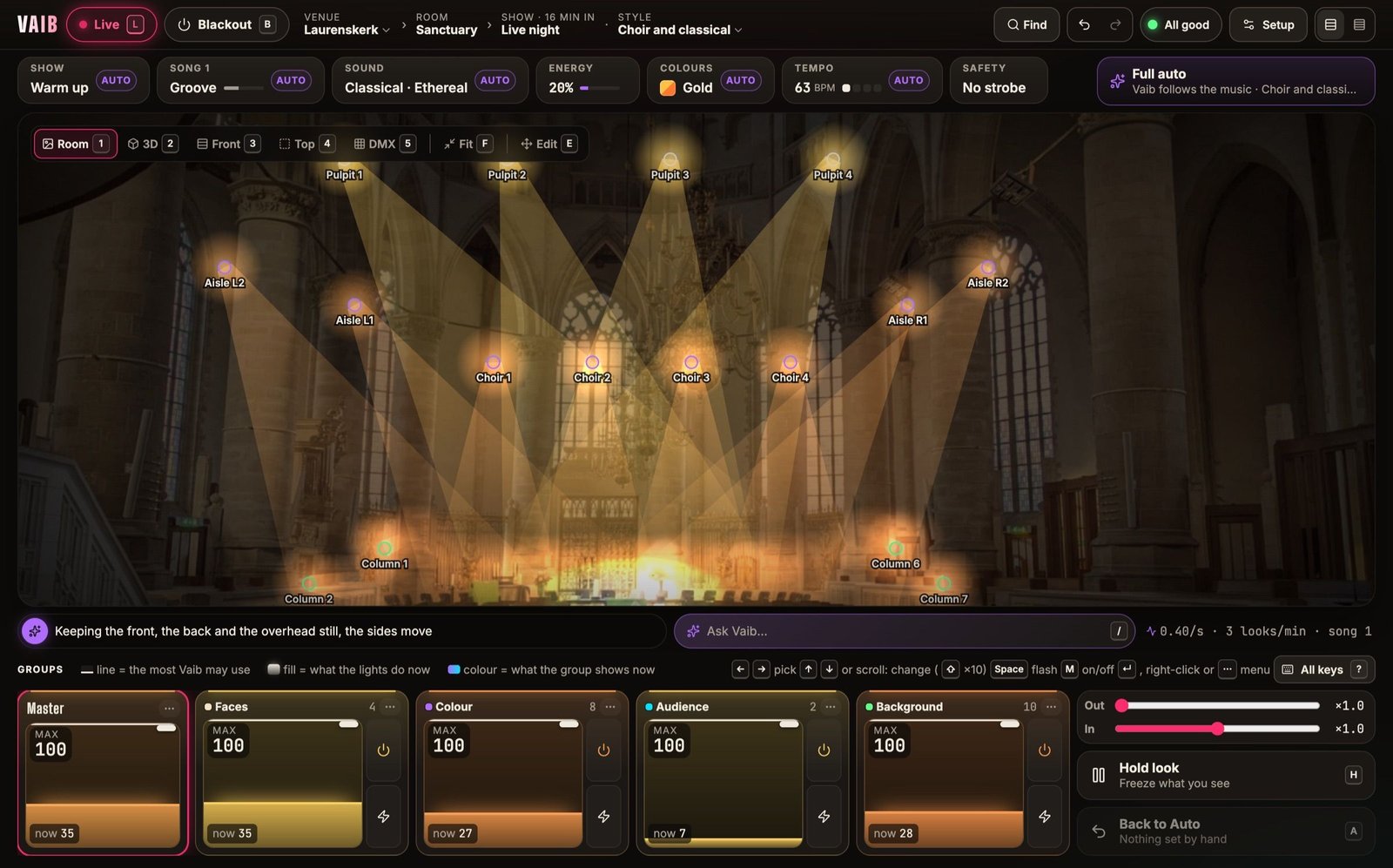
Pick a built-in Style for the night — Rock night, Jazz and dinner, Choir and classical, Club peak — or keep the venue’s house look. Vaib hears speech and silence, so a talk between sets is held in steady light and the colour chases stop.

The Vaib desk, Live at Laurenskerk: the nave of a gothic church lit in warm gold beams, Choir and classical style, no strobe.
Laurenskerk, 24 lights, “Choir and classical”: warm and still, no strobe.

And the rest a venue asks about

More than one room

A venue can have several rooms, each with its own rig, photo and sign-off. A second room can follow the stage at its own level.

Another desk on the network

If something else starts sending to your universe, Vaib says who, where and what it means, within about two seconds.

If the laptop stops

The room’s own choice applies: hold the last look, fade to black, or the safe scene.

It learns your taste

After a show Vaib proposes at most three small changes from what your staff kept correcting. A Manager accepts or not.

Recordings for tuning

Each night is kept as numbers, never sound, on that computer. Export one to send for tuning; delete them whenever.

Venues move with you

A venue is one file to export and import — rooms, lights, output, shows, Styles.

Free tool

No lights yet? Plan the rig before you buy it.

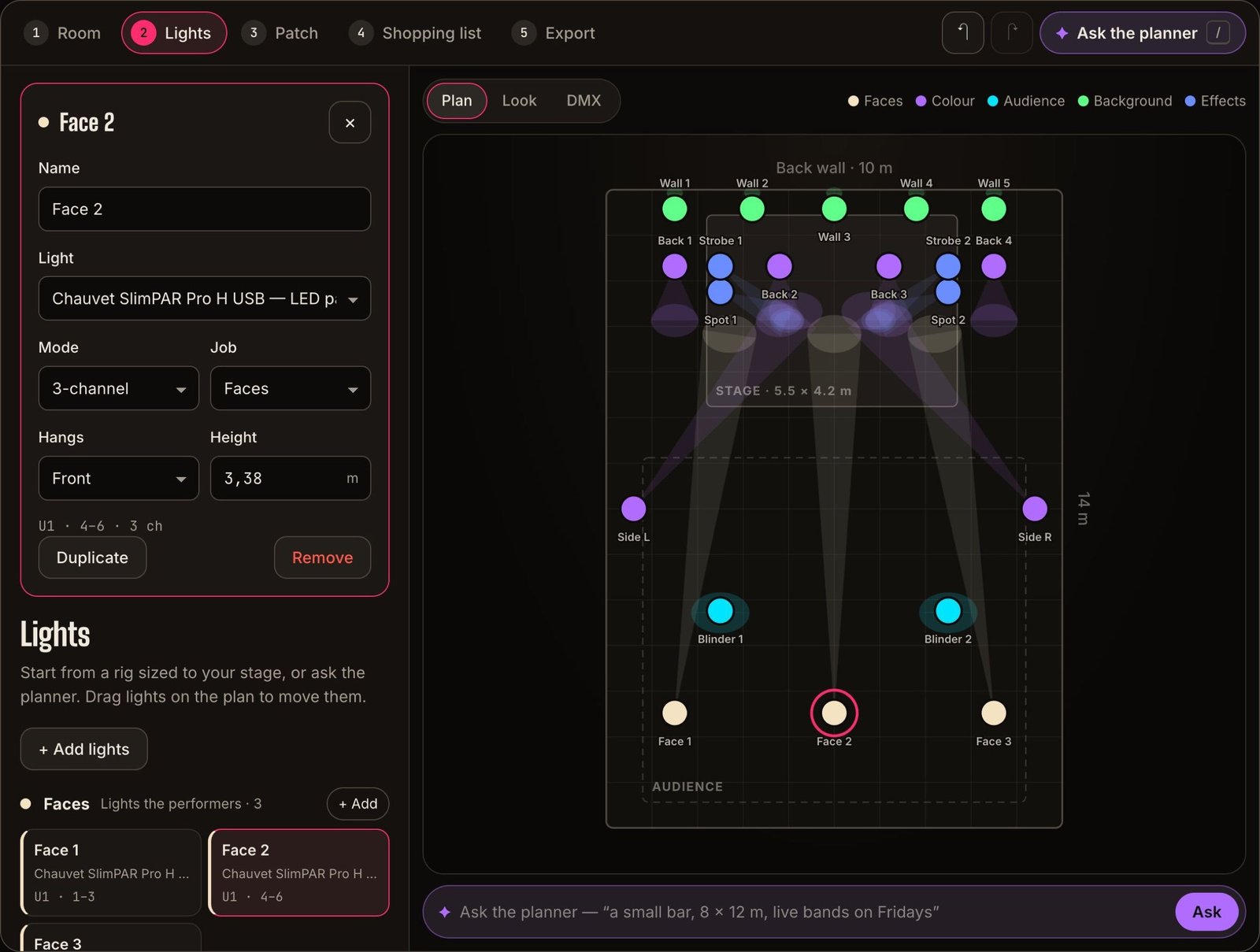
Measure the room, get a rig sized to your stage and a shopping list with prices — then import the plan into Vaib when the lights are up.

  • No account
  • AI planner
  • Shopping list with prices
  • Exports to Vaib
Open the free planner →
The free lighting planner: a 10 × 14 m room seen from above with twenty lights coloured by job — wall uplights, back washes, spots, side lights, blinders and face lights — and the picked light’s model, mode, job, height and DMX address on the left.

Questions

What people in your seat ask.

Something not here? Email us — a person replies.

Who on my team can use it?
Whoever is on shift. The Show screen has seven plain controls along the top, a strip per group of lights, Hold and Back to Auto. Patching, outputs and raising limits are for a Manager, in Setup — a bartender cannot break the rig by accident.
What hardware do I need?
A laptop and the DMX gear you already have: a network node (sACN or Art-Net) or a USB DMX interface. Vaib sends sACN multicast by default, so most nodes pick it up with no IP to type.
Can it run all night unattended?
That is the point. It keeps the Mac awake while Live, keeps sending at full rate in the background, and restarts its output by itself if it ever has to. You still decide what happens if the laptop is switched off: hold, fade to black, or the safe scene.
What does the beta cost, and what happens after?
Nothing. Everyone who tests in the beta gets a year of Vaib free after launch. After launch, pricing will be a subscription per room; it is not final yet, and venues in the beta help shape it.
Free beta — open now

Try it on your own rig. The beta is free.

Request a place and we send you the Mac app, help you patch your first room, and listen to what you think. Run real nights with it before it opens properly.

  • Mac now · Windows in about a month
  • Free while it is in beta
  • A year free after launch for testers